Graphical user interface:-
In computing, a graphical user interface (GUI, sometimes pronounced "gooey" or "gee-you-eye") is a type of interface that allows users to interact with electronic devices through graphical icons and visual indicators such as secondary notation, as opposed to text-based interfaces, typed command labels or text navigation. GUIs were introduced in reaction to the perceived steep learning curve of command-line interfaces (CLIs), which require commands to be typed on the keyboard.The actions in a GUI are usually performed through direct manipulation of the graphical elements.In addition to computers, GUIs can be found in hand-held devices such as MP3 players, portable media players, gaming devices and smaller household, office and industry equipment. The term "GUI" tends not to be applied to other low-resolution types of interfaces with display resolutions, such as video games (where HUD is preferred), or not restricted to flat screens, like volumetric displays because the term is restricted to the scope of two-dimensional display screens able to describe generic information, in the tradition of the computer science research at the PARC (Palo Alto Research Center).
User interface and interaction design:-
Designing the visual composition and temporal behavior of a GUI is an important part of software application programming in the area of human-computer interaction. Its goal is to enhance the efficiency and ease of use for the underlying logical design of a stored program, a design discipline known as usability. Methods of user-centered design are used to ensure that the visual language introduced in the design is well tailored to the tasks.The visible graphical interface features of an application are sometimes referred to as "chrome" or "Gui" (Goo-ee). Typically, the user interacts with information by manipulating visual widgets that allow for interactions appropriate to the kind of data they hold. The widgets of a well-designed interface are selected to support the actions necessary to achieve the goals of the user. A model-view-controller allows for a flexible structure in which the interface is independent from and indirectly linked to application functionality, so the GUI can be easily customized. This allows the user to select or design a different skin at will, and eases the designer's work to change the interface as the user needs evolve. Good user interface design relates to the user, not the system architecture.
Large widgets, such as windows, usually provide a frame or container for the main presentation content such as a web page, email message or drawing. Smaller ones usually act as a user-input tool.
A GUI may be designed for the requirements of a vertical market as application-specific graphical user interfaces. Examples of application-specific GUIs are:
- Automated teller machines (ATM)
- Point-Of-Sale touchscreens at restaurants
- Self-service checkouts used in a retail store
- Airline self-ticketing and check-in
- Information kiosks in a public space, like a train station or a museum
- Monitors or control screens in an embedded industrial application which employ a real time operating system (RTOS).
Examples:-
Sample Graphical Desktop Environments-
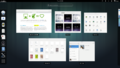 GNOME Shell (Gnome-3)
-
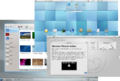 KDE Plasma (KDE 4)
-
 Unity
Unity
-
 Xfce
Xfce
-
 Enlightenment
-
 Sugar
Sugar
-
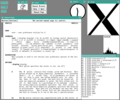 An early X Window System
-
 Windows on a Wayland compositor


0 comments:
Post a Comment